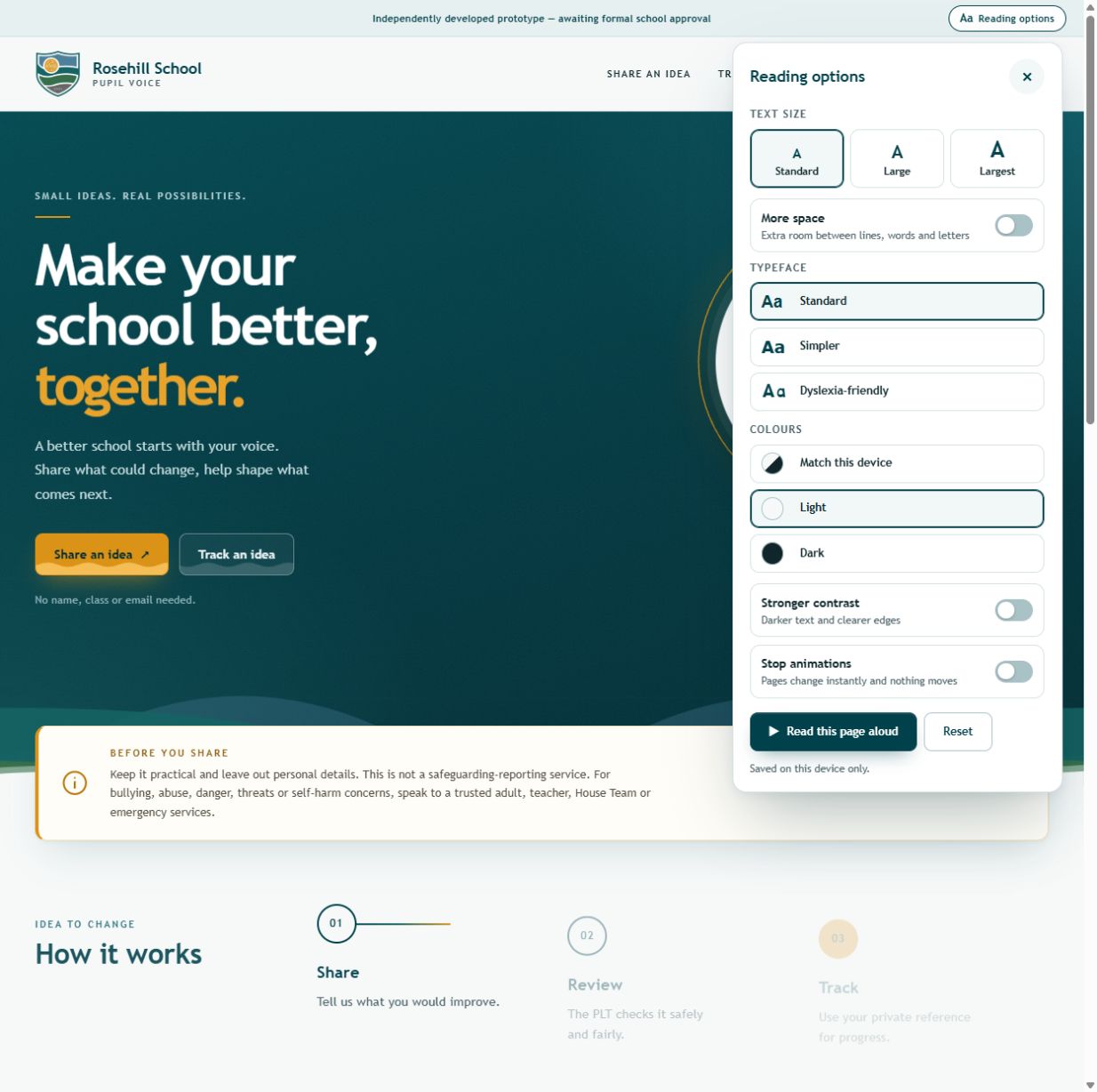
Text size, spacing, typeface, contrast and motion controls sit together in Reading options. Pupils can change how the page reads before they start an idea.
01 / Walkthrough
● ● ● PUPIL VOICE / SCREEN STUDY00:24
Explore Reading options in the independent prototype. Awaiting school approval; no idea is submitted.Read the step-by-step notes ↗
A prototype with a clear boundary.
The public prototype exposes reading controls alongside its share, review and private-reference journey. The walkthrough explores the interface without submitting an idea. School approval is still pending; no school adoption or pupil outcomes are claimed.
Text size, spacing, typeface, colours, contrast and motion are grouped in one panel.
HOW THE PIECES CONNECT
Participation needs a route beyond the first form. The proposed journey explains where an idea goes, who would review it and how its contributor could return. A private reference makes that return path visible without a public list of named submissions.
Reading controls and privacy guidance can be inspected in the prototype today. The walkthrough demonstrates preference changes and form guidance without sending an idea. Formal school approval remains pending; the portfolio presents the interface and intended journey.
03 / Build decisions
01 /
Include a way back to an idea.
The prototype presents a share, review and track journey. A private reference provides a route back to an idea’s progress; the proposed review stage names the Pupil Leadership Team, and a published-outcomes area gives the journey a destination beyond submission.
THE TRADE-OFF
Reference-based tracking avoids requiring a name or email for the described return journey. The contributor needs to retain that reference.
WHAT TO CHECK
Inspect the tracking form and its explanation. The prototype states that the reference is the way to look up an idea; no submission was made for this walkthrough.
02 /
Put reading preferences within reach.
Text size, spacing, typeface, colours, contrast and motion controls sit in one Reading options panel. They are available before starting an idea, so presentation can be adjusted without completing the form.
THE TRADE-OFF
The panel adds choices but groups them around one purpose: changing how the page reads. Preferences are stored on the device.
WHAT TO CHECK
The walkthrough selects Large text and Dark colours. The page presentation changes, and the original reading settings are restored afterwards.
03 /
Explain what belongs in the space.
The prototype invites practical school-improvement ideas and asks contributors to leave out identifying details. Guidance distinguishes suggestions from urgent or safeguarding concerns, while the approval notice keeps the prototype’s status visible.
THE TRADE-OFF
There is more to read before participating, but the form’s purpose and limits are explicit. School approval and operational adoption are not established.
WHAT TO CHECK
Read the prototype notice and the guidance beside the form. The demonstration stops before sending anything; formal school approval is still pending.
[ 01 / THE QUESTION ]
What happens after an idea?
The problem
A suggestion needs a route beyond being submitted. Pupils need to understand what belongs in the space, who reviews it, and how to return to an idea later.
The approach
The prototype follows a share, review and track journey. A private reference lets pupils follow progress without providing a name, class or email.
[ 02 / FROM INTENT TO INTERACTION ]
A path through the product.
01
Share
Describe a practical change, choose a category and explain how it could help.
02
Review
The proposed journey gives the Pupil Leadership Team a clear place to review suggestions.
03
Track
Return with the private reference to look up an idea's progress.
04
Participate
The prototype includes a place for published outcomes, so pupils can return to see what has changed.
[ 03 / UNDER THE SURFACE ]
Considered boundaries.
01 /
Privacy by interaction
Forms ask pupils to avoid identifying details. Tracking depends on the private reference rather than a public list of named submissions.
02 /
Reading options
The live prototype offers text-size, spacing, typeface and contrast preferences, a motion setting and read-aloud controls.
03 /
Clear boundaries
The interface distinguishes practical improvement ideas from urgent concerns and directs pupils to trusted adults or the appropriate school team.